

Managed WordPress: safe updates, malware scans and uptime checks
Add Managed WordPress to a site, choose when updates run, read the e-mails, undo an update, act on scan findings and cancel.
Managed WordPress is an optional add-on for a WordPress site on THOST web hosting: £3.49 a month or £34.90 a year per website, on any plan. We update WordPress, your plugins, themes and translations with a backup first and an automatic undo if an update breaks anything, scan the site for malware every week, check it is up every 5 minutes and send you a monthly report.
Steps: add it
- Open the website. In the dashboard open Websites, your WordPress site, then the Overview tab.
- Press Add Managed WordPress on the Managed WordPress card. The card appears once WordPress is installed on the site.
- Pay the invoice. It starts as soon as the invoice is paid, and the first scan runs a few minutes later. It renews with your hosting plan.
Settings
Press Settings on the card:
- Day (weekly updates) or Every night: updates run between 2 and 5 am UK time.
- Also check this page after updates (optional): a path on your site, such as your shop or contact page, checked as well as the home page.
- Leave these plugins alone (optional): plugin folder names, separated by commas. We never update them.
- E-mail me after every successful update and E-mail me when my site goes down and when it is back. You always get an e-mail when an update is undone or a scan finds something.
What an update does
- Installs WordPress minor and security releases, plugin, theme and translation updates. New major WordPress versions are not installed automatically. Premium plugins update only if they use WordPress's normal updater.
- Backs up the site's code and database first (not your uploads folder, which updates do not touch).
- Checks your home page (and your chosen page), that WordPress still loads with all its plugins, and the site's error log for new PHP fatal errors.
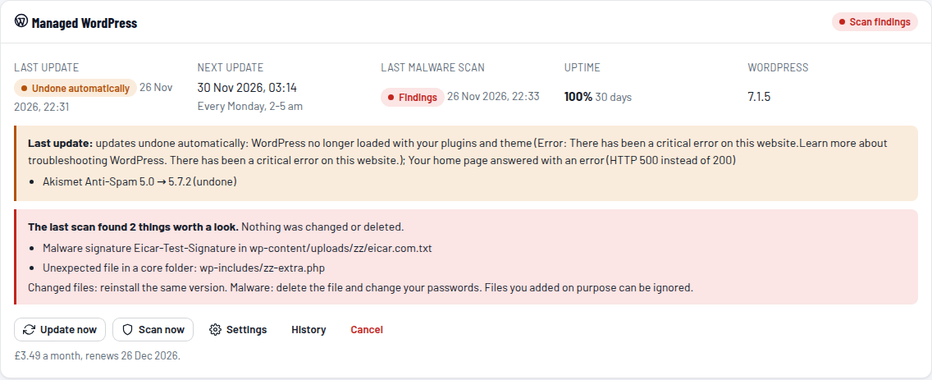
- If anything got worse, puts the backup back automatically and e-mails you what it saw and which update caused it. The card shows Undone automatically.
Undo last update puts the site back to just before the last update, for up to 14 days (until the next update). Changes made on the site since then (posts, orders, comments, settings) are lost. Press History for every update, undo and scan. Update now and Scan now run one straight away.
Scan findings
The weekly scan compares WordPress core and plugin files with the official wordpress.org copies and runs a virus scan of wp-content. Nothing is changed or deleted.
- Changed WordPress or plugin file: reinstall the same version (in WordPress: Dashboard, Updates, Re-install, or reinstall the plugin).
- Malware signature: delete the file and change your WordPress, FTP and database passwords.
- A file you added on purpose: you can ignore it.
Cleaning a hacked site is not part of the add-on, but you can reply to the e-mail for help.
Uptime e-mails
We check the site every 5 minutes and e-mail you when it has been down for about 10 to 15 minutes, and again when it is back. These e-mails are never sent during our own maintenance or outages, which are on status.t-host.co.uk. Uptime is checked while your domain points at THOST; free t-host.app addresses always qualify.
Questions
Do I still need backups?
Your hosting plan keeps daily backups anyway (restore a backup). Managed WordPress adds a backup right before each update.
How do I cancel?
Press Cancel on the card. It keeps running to the end of the period you have paid for, and you can keep it any time before then.
Does it work on a VPS?
No, only for WordPress sites on THOST web hosting (Starter, Business or Pro).
Did this not solve it? Open a support ticket and tell us which guide you followed. We answer every ticket ourselves.